onomo is in open beta — help us shape the future of music production.Learn more →
Cat. ONO-001 · Out now

Make the song. And everything around it.

The beat, the cover, the video, the lyrics and the rollout. One tab, one project, and not a single export between them. A real studio, a real design editor and a real video editor, each good enough to stand alone. Together, they work from one project.

Start freeSee what’s insideFree to start · no card · no install
The problem

Your song deserves better than five apps and a downloads folder.

Putting out one song today takes a DAW, a design app, a video editor, a notes app and a calendar that have never heard of each other. You bounce, export, re-upload, re-type and re-time, and every handoff costs momentum you don't get back. We built Onomo so an independent artist never has to be their own IT department again. And this isn't a bundle of toys. The design editor puts photo, vector, video and real 3D in one document. The video editor has a 3D camera and an ear for your track that no other browser editor has. Each of the four could be a product on its own. Nobody had built a creative suite music-first, so we did.

Track listing

Four tools. One tab. Start from anywhere.

The track, the cover, the video and the words. Each one good enough to replace an app you're paying for now, and each one click from the other three. Pick one and look inside.

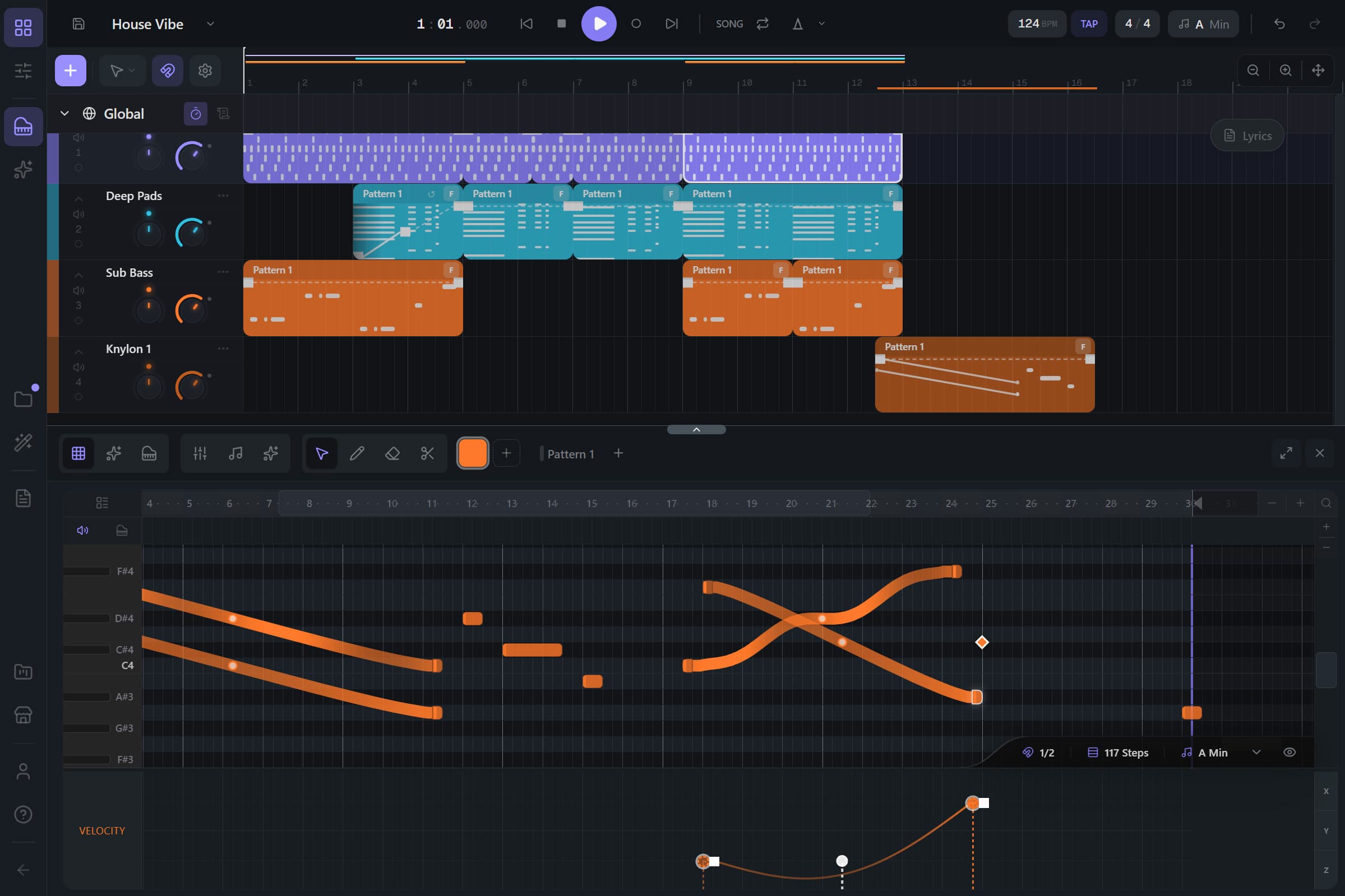
Onomo Studio arrangement with a 16-bar song and the piano roll open
In the app · Studio
A1 · Studio

Make the track.

A full DAW in a browser tab, running on its own audio engine. Not a sample player in a costume.

  1. 01
    50 synth engines

    Subtractive, FM, wavetable, granular, additive, physical modeling, feedback and more. Every one is hand-written DSP, not a preset pack on a sampler.

  2. 02
    28 drum engines + step sequencer

    Kicks, snares and hats synthesized from scratch, then sequenced per step: velocity, probability, length, pan, pitch and reverse.

  3. 03
    42 effects + Track EQ

    Reverbs, delays, dynamics, saturation, pitch, modulation, glitch and a mastering strip. Chain them on every track, bus and the master.

  4. 04
    Ono, your AI in the session

    It writes editable MIDI, patterns and presets straight into your project. You never get a rendered bounce you can’t change.

  5. 05
    Arrange, automate, mix, export

    Tempo automation, per-segment LFOs, live collaboration, and WAV / MP3 export up to 96 kHz. Nothing to install, ever.

A2 · Journal

Write the words. Plan the release.

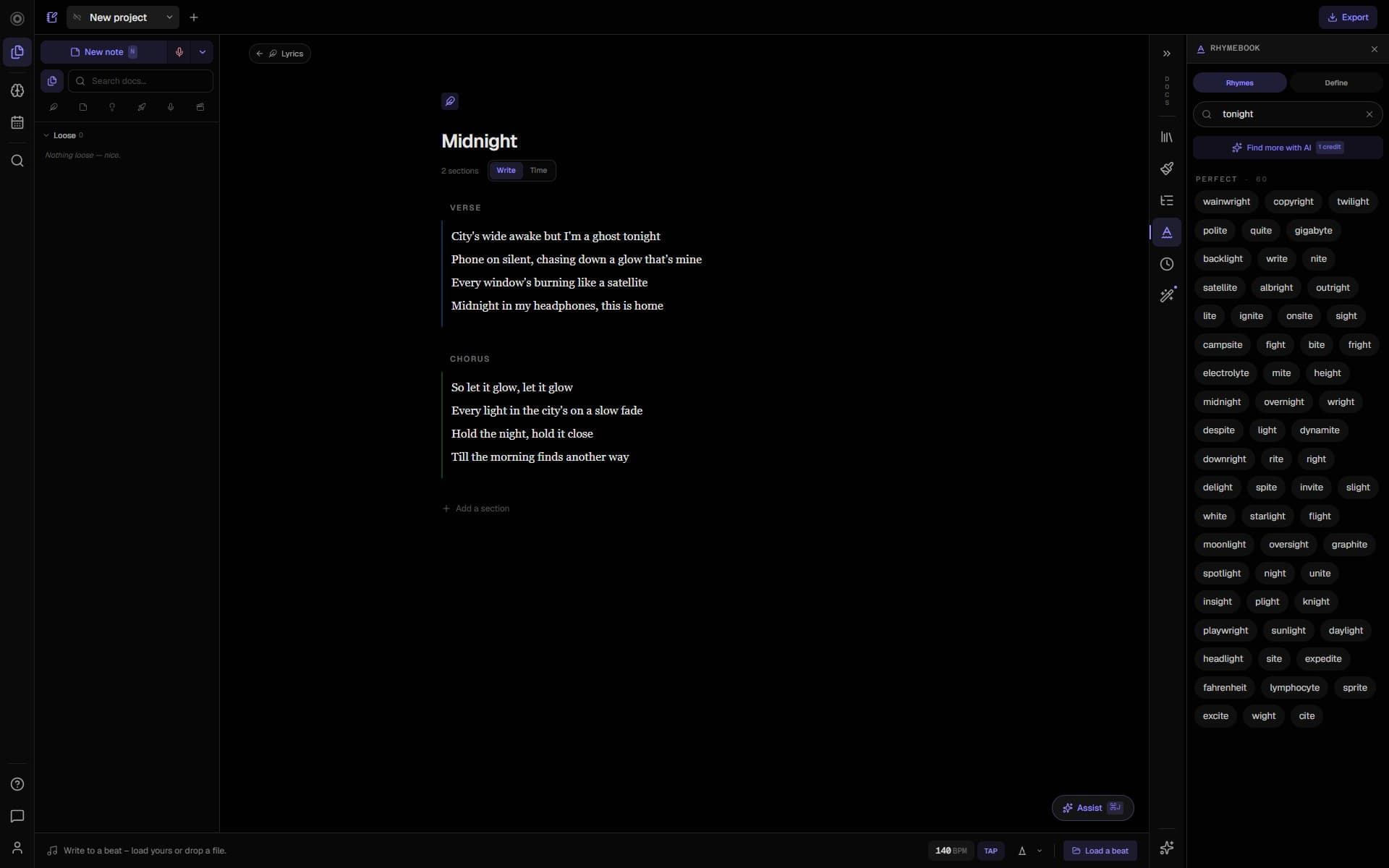
Where the song starts and where the release gets planned. Lyrics, voice memos, ideas, concepts and the rollout, in one notebook.

  1. 01
    Lyric editor with a built-in rhyme finder

    Color-coded sections, version checkpoints, and perfect/near/slant rhymes (including multi-word chains) without leaving the page.

  2. 02
    Six modes for the whole idea

    Write, Notes, Memos, Brainstorm, Concept and Roster. Everything from the first hum to the release plan.

  3. 03
    Voice memos that transcribe themselves

    Sing or say the hook the second it shows up. The words transcribe live, then go straight into a lyric or a note.

  4. 04
    An infinite brainstorm canvas

    Text, lyric, note, image, audio and palette cards on one board, laid out the way ideas really sit before you’ve decided anything.

  5. 05
    A planner that’s already caught up

    Roster mode is wired to your live projects: what to work on, the week ahead, and what’s about to slip, with nothing to re-enter.

B1 · Canvas

Design anything. Animate it to the song.

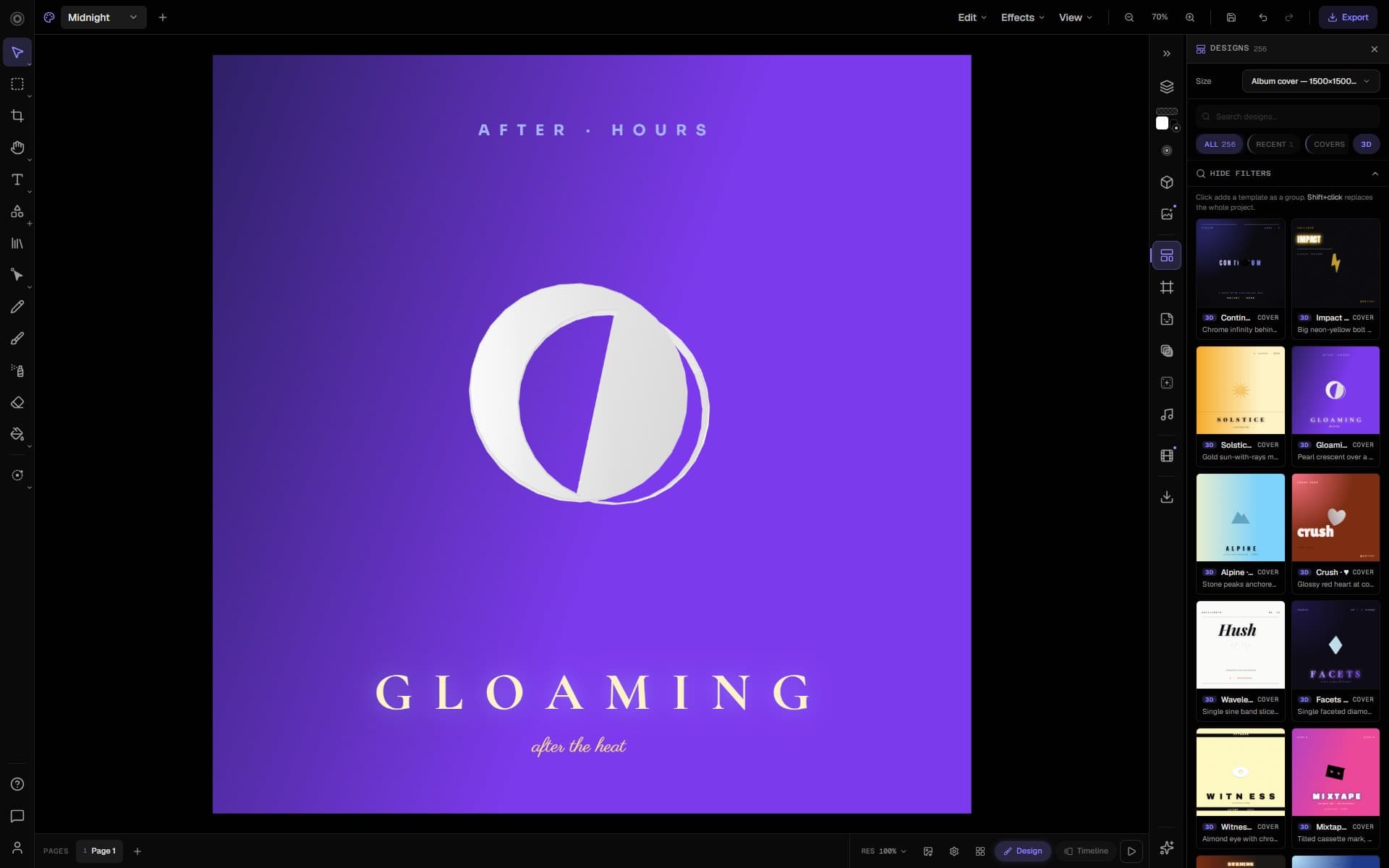
Photo, vector, video, real 3D and a keyframe timeline in one document. No other browser editor puts all of it together, and none of them can hear your song.

  1. 01
    A real layered editor

    Image, text, shapes, paths, adjustment and filter layers, with opacity, blend modes, masks and groups, plus a genuine 3D workspace and extruded 3D text with real materials and lighting.

  2. 02
    React to your actual song

    240+ animated generators, 100+ that pulse to the music. Bind your track and the visual reacts live in preview, then exports baked to the beat with the song muxed in. The only design editor in a browser where your layers dance to your music.

  3. 03
    Animate without leaving the tab

    Flip Design ⇄ Timeline for keyframes on transforms and properties, one-click scene vibes, curved motion paths, and beat-snap. Or just set a layer’s movement right in its inspector.

  4. 04
    Pages that morph

    Design each page like its own artboard, then play them as one video with smooth crossfade / slide / morph transitions between them. A couple of clicks. No After Effects.

  5. 05
    Export anywhere

    One design out to Spotify, IG, Story, TikTok, YouTube and more, plus audio-synced MP4 / WebM loops with alpha, client-side and free.

B2 · Motion

Cut the video.

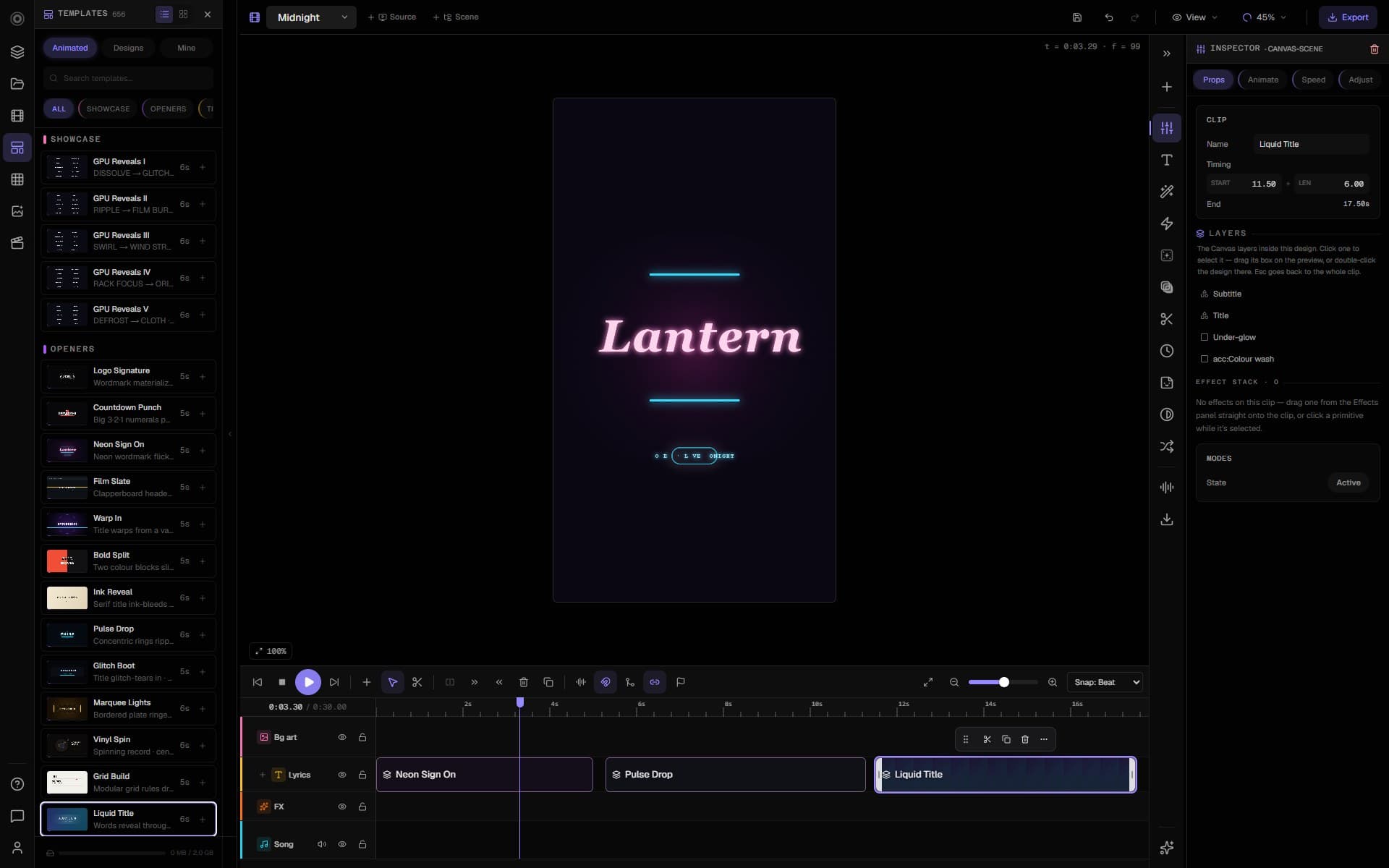
The only browser video editor where the visuals actually hear the music, with a real 3D camera nothing else on the web has.

  1. 01
    Visuals that hear the track

    Bind scale, opacity, blur or hue to the hits, the bass or the melody. The zoom-punch that eats an afternoon in After Effects is one click here.

  2. 02
    Lyric video, auto-timed

    Tap to time, import an .lrc, or let Whisper align every word on your own machine. No upload, no per-minute meter. Then karaoke sweeps, typewriter and more.

  3. 03
    A real motion engine

    GPU compositor with 3D transforms and camera, keyframes on every parameter, effects, generators, particles and transitions.

  4. 04
    156 text styles, 656 scene templates

    Reveal animations per character, word or line (fade, slide, scale-pop, blur-in, typewriter, karaoke, bounce) plus ready-made openers, titles, countdowns, credits and end cards.

  5. 05
    Frame-accurate MP4 export

    Hardware H.264 + AAC, multi-aspect presets for every platform, encoded on your own GPU in the browser.

The handoff

Write it once. Every app picks it up.

A release is a track, a cover, a video and a hundred small decisions. Each one stays its own project, so you can sketch and throw things away freely. But when you want them to talk, they already can. The lyrics you wrote are the lyrics in the video, and the title you typed once is the title on the cover.

01
Studio
Make the track.
02
Journal
The lyrics come along.
03
Canvas
The cover pulls in your title.
04
Motion
The video hears the kick.
Everywhere else
  • Bounce the mix, upload it somewhere else.
  • Re-type the lyrics into a different app.
  • Export the cover, then resize it six times.
  • Re-time lyrics you already timed once.
Here

Start it from your song, or from nothing.

Open a cover from a track and your title, artwork and waveform are already on the page. Lyrics you timed once drop straight into the video. Or start any of them blank and never connect a thing. The link is there when you want it. You never have to re-export, and you never have to explain your song twice.

No song required

Don’t make music? Come in anyway.

Canvas and Motion aren't add-ons to a DAW. One is a full design editor, the other a full video editor, and each holds its own against the best on the web. Make thumbnails, carousels, banners, posters, YouTube edits and short films with no song anywhere near the project. Music is their superpower. You don't need it to get in.

YouTube thumbnailsIG posts & carouselsAd bannersPosters & flyersLogos & 3D titlesYouTube videosReels & TikToksShort filmsPodcast clipsVisualizers
Liner notes · personnel

Every engine, by name.

Producers shop for instruments by name, so here are ours. There are no sample players on this list. Every engine is written from scratch for Onomo, and every one is on the free plan.

Synthesis50
  • Kryo
  • Dyrt
  • Zynq
  • Embyr
  • Wynd
  • Aethyr
  • Myst
  • Bazyr
  • Sylo
  • Knylon
  • Ampyr
  • Symple
  • Formynt
  • Hyper
  • Plexyr
  • Pryzm
  • Seqyr
  • Synfyny
  • Tymbre
  • Vektyr
  • Chymer
  • Flyte
  • Kalyx
  • Nybl
  • Opyx
  • Orbyt
  • Pyani
  • Reznyr
  • Tapyr
  • Westyr
  • Acyd
  • Bowyr
  • Flok
  • Gyre
  • Howlr
  • Kaos
  • Blossym
  • Knokk
  • Merj
  • Mneme
  • Ovrflo
  • Ryko
  • Skann
  • Spyke
  • Spyrl
  • Squyz
  • Strynger
  • Syllabyl
  • Sytar
  • Undyr
Percussion28
  • OnoKick
  • Ono808
  • OnoSnare
  • OnoClap
  • OnoHat
  • OnoOpenHat
  • OnoPerc
  • OnoCym
  • OnoShake
  • OnoTom
  • OnoKick II
  • OnoSnare II
  • OnoHat II
  • OnoCym II
  • OnoClap II
  • Ono808 II
  • OnoPerc II
  • OnoTom II
  • OnoShake II
  • OnoKick III
  • OnoSnare III
  • OnoHat III
  • OnoCym III
  • OnoClap III
  • Ono808 III
  • OnoPerc III
  • OnoTom III
  • OnoShake III
Effects43
  • Track EQ
  • OnoVerb
  • OnoDlay
  • OnoChorus
  • OnoFlanger
  • OnoPhaser
  • OnoComp
  • OnoLimiter
  • OnoGate
  • OnoSat
  • OnoFilter
  • OnoEQ
  • OnoTune
  • OnoGlitch
  • ModiFire
  • OnoSnap
  • OnoSmash
  • OnoDuck
  • OnoEQ 2
  • OnoVerb 2
  • Preachyr
  • OnoPitch
  • OnoRez
  • OnoWide
  • OnoRise
  • OnoGlow
  • OnoSpin
  • Shyne
  • Mastyr
  • Buckyt
  • Shyft
  • OnoSpring
  • OnoRotary
  • OnoTape
  • OnoClip
  • OnoCloud
  • OnoGhost
  • OnoVox
  • OnoDice
  • OnoDrunk
  • OnoStep
  • Matryx
  • OnoDust
Ono

AI that hands you the pen. Never the finished track.

Ono works across the whole project and leaves every decision with you. The point was never to do the making for you. It’s there to clear away the parts that get in the way.

It works inside the project
It isn’t a chat window that coughs up a file. Ono makes moves in the thing you’re actually building, right where you can see them.
Everything stays editable
Patterns, parts and suggestions are all yours to grab, move and undo. Think of it as a collaborator, not a vending machine.
So the work stays yours
You shape every note and every frame, so what you release is your work. That’s the whole design.
PricingFree to start · Plus $6 · Pro $10 / mo

Free to make. Upgrade for room, or for AI.

Every instrument, effect and editor is on the free plan. Plus gives you the room a real catalog needs, with no AI bundled in. Pro adds Ono on top, for the year you start releasing seriously and want the AI images, video and credits too.

Free

$0/mo

The whole suite to start. Not a trial and not a demo.

  • Every surface: Studio, Canvas, Motion, Journal
  • All 50 synth + 28 drum engines, all 42 effects
  • Foundry generators + the full toolkit
  • Monthly AI credits for the assistant + Journal
  • Cloud saves in every app
  • Join collab sessions

Plus

$6/mo

For making a lot, without paying for AI

  • Everything in Free, plus:
  • Unlimited projects + drafts
  • 20 GB storage
  • Host collab sessions, up to 5 people
  • A Plus badge + priority support
  • No AI bundled in

Pro

For releasing
$10/mo

Everything in Plus, with Ono

  • Everything in Plus, plus:
  • AI images, video, upscaling + Studio stem splitting
  • 1,000 AI credits / month
  • 50 GB storage
  • Host collab sessions, up to 10 people
  • A Pro badge + discounted credit packs

Only AI uses credits: a small monthly allowance on Free and Plus, 1,000 on Pro. AI images, video, upscaling and Studio stem splitting are part of Pro. Releasing something big? Top up for the month you need it.No card for Free. Cancel Plus or Pro whenever you like. Your projects stay put.

FAQ

Fair questions. Straight answers.

No fine print, no asterisks.

Yes, and not in the trial sense. Studio, Canvas, Motion and Journal, plus every instrument, effect and tool, are on the free plan, with a monthly allowance of AI credits. Plus adds storage, unlimited projects and session hosting; Pro adds AI credits, images and video on top. Plans can change as Onomo grows; if they do, you hear it from us first.

No. The audio engine, the GPU video engine and the design editor all run in your browser. Open a tab, sign in, and your projects are waiting. There are no downloads, no updates and no plugin folders to babysit.

It’s built for the self-made artist, but you don’t have to make music at all. Canvas is a full design editor for thumbnails, posts, banners and posters. Motion is a full video editor for YouTube edits, reels and short films. Each one stands on its own. If you do make music, the tools also talk to each other, and that’s where it gets unfair.

Completely. Your recordings, synth sounds, designs and videos are yours, commercial use included. Foundry’s generators run on rules and aren’t trained on anyone’s catalog, so the kits, loops and MIDI they give you are yours to release too.

Yes. Studio is live and multiplayer, like a shared doc. You get cursors, presence and per-person permissions for who can record, mix, edit the arrangement or use AI. Free accounts can join any session they’re invited to. Plus accounts can host sessions with up to 5 people, and Pro accounts with up to 10.

Nothing breaks. The whole suite keeps working, because none of it runs on credits. Credits only pay for AI generation, and they refill every month. If a release month needs more, top-up packs last a year from your latest top-up and stay yours even if you cancel.

Your next release starts here.

The song, the cover, the video and the plan, all in one tab. No download, no card, and nothing to learn before you start making.

Or try the free toolkit — 36 tools, no account